Medical Chest Portal information
Thanks to the Kinghorn Foundation, the Royal Flying Doctor Service (Queensland Section) (RFDS) is pleased to provide medical chest holders with a secure website (portal) to manage their medical chest online. This innovative platform is designed to make your experience simpler, faster, and more convenient. Here’s what you can enjoy right now:
- No more paper forms – all key processes are now fully digital, saving you time and reducing the potential for errors.
- Streamlined ordering – reorder, report usage, receipt of medicines, and track expiry dates all from one central location.
- Greater efficiency – everything you need is in one place for a smoother, more organised process.
If you don't have a medical chest, click here.
Need help getting started?
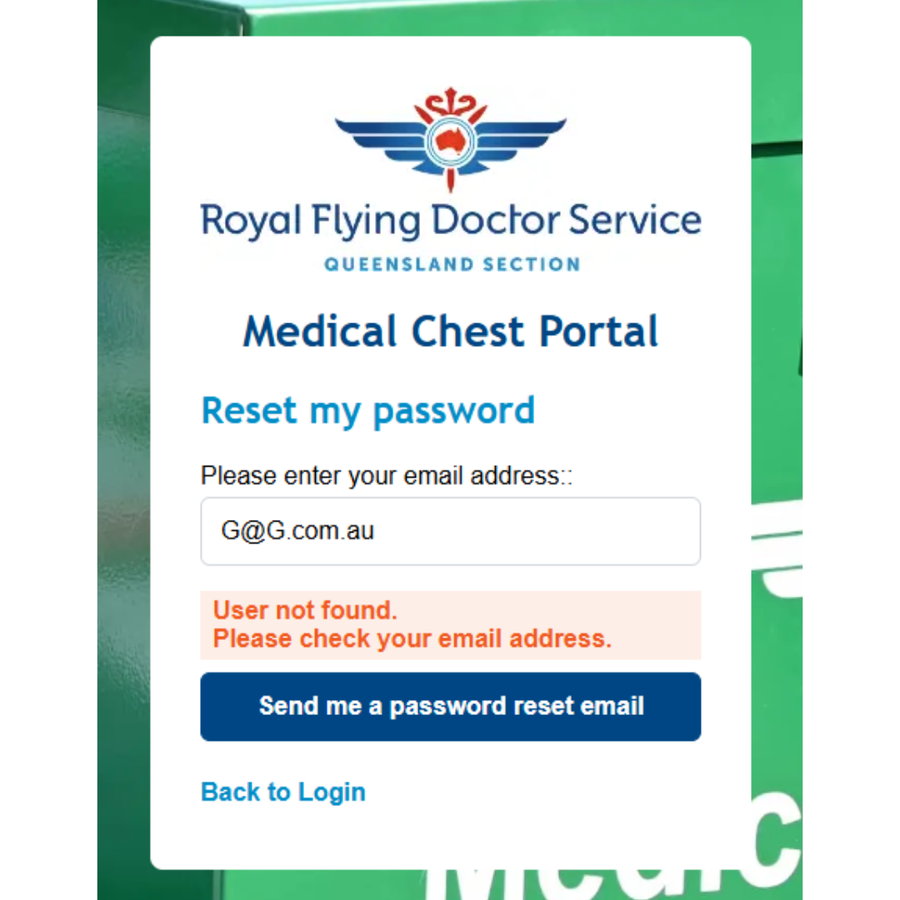
When attempting to log in to the Medical Chest Portal for the first time, select ‘forgot password’ on the login screen. Enter the email address associated with your medical chest account and click 'send me a password reset email.’
You will receive an email with instructions to set your password.
If you encounter an error message during this process, please contact the Medical Chest Service Team to verify and update your registered email address and/or mobile phone number.
Please note: The portal uses an extra security step to keep your account safe. After you enter your password, it will send a code to your mobile phone. You’ll need to type this code into the login screen to finish signing in. This helps make sure only authorised users can access your medical chest account.
Once you log in to the portal, you will find a complete user guide in the footer section, under Information.
Training videos
Below you will find a selection of short educational videos on how to use the various functions of the portal.
Frequently asked questions
What is a portal?
The Medical Chest Portal is a website that you can log into to access information and manage your medical chest. We call it a portal because it's a website that requires a login and only displays information relevant to you.
Do I have to use the portal?
It will not be mandatory for you to use the portal; however, we think you will want to use the system, as it will make managing the chest a lot easier. Once you start using the portal, we recommend using all of the functionalities to ensure there is no double-handling.
Why would I want to use the portal?
It is a simple system to help you order replacement medications and supplies for the chest. It is as easy as ordering your groceries or doing online shopping.
How will I know how to use the system?
There is a user guide available in the portal, which can be found under 'information' at the bottom of the page. Additionally, short videos will be available to show you the key functions of the portal.
I’ve updated my email address and/or mobile phone number and can no longer access the portal.
Access to the portal is only available via the email address and mobile phone number listed under the chest user details. Please reach out to the Medical Chest Service team at medicalchest@rfdsqld.com.au to update your details.
What is the difference between an authorised person and a nominated person?
None. The portal uses the term authorised person as a standard; however, in some instances, you may see nominated person referenced.
What do I do if the chest location is incorrect on the map?
If your chest location icon is showing as incorrect on the map, you can zoom out until you can view the icon and your location on the map, then click and drag the icon to the correct location and save. Also, set the accuracy field to ‘coordinates are accurate’.
Can I change an audit or transfer form once submitted?
No changes can be made once a form has been submitted. Contact the Medical Chest team at medicalchest@rfdsqld.com.au to amend or delete the form on your behalf.
How do I add authorised persons to my chest?
Contact the Medical Chest team at medicalchest@rfdsqld.com.au.
How do I order monitored medications?
Click 'update' next to the monitored medication in the manage contents page, enter the reason (damaged, missing, expired, prescribed), and submit the order.
How do I mark an order as received?
Go to 'view orders', select 'view' on the relevant order, click 'receive items', and enter the quantity received and expiry dates.
How do I return expired or damaged monitored medications?
Go to 'return items', select 'return drugs to RFDS', enter the return date, registered post number, and quantity, then print the shipping note.
How do I perform a monthly morphine stocktake?
Go to the 'morphine stocktake register,' click 'add stocktake', enter the morphine quantity, select the person performing the stocktake, and add comments if needed.
If you have any questions or concerns, please reach out to the Medical Chest Service team via email medicalchest@rfdsqld.com.au.